 Michał Wołoszyn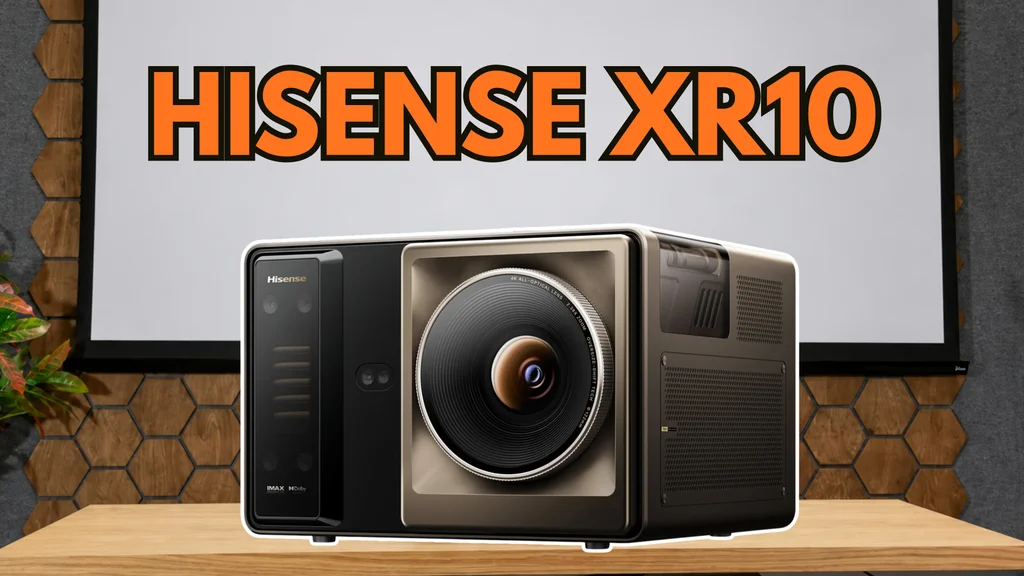
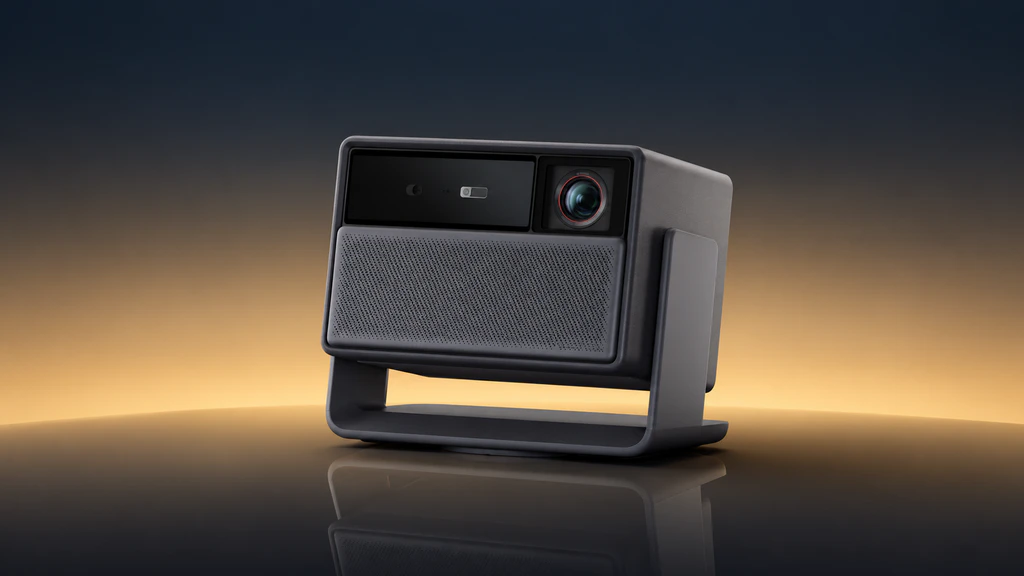
Hisense XR10 is a projector for people for whom 100 inches is no longer enough. A triple RGB laser, optical zoom, a large range of lens shift and a built-in VIDAA system are intended to allow comfortable use of images measuring 150, 200 or even 300 inches diagonally. A price of around PLN 22,000, assumed in our test, however places concrete demands on picture quality. So we checked everything: brightness, contrast, colour reproduction and gaming capabilities, as well as how the XR10 performs in everyday use.
Hisense XR10 - Is it worth buying? Verdict
The Hisense XR10 responds very well to the needs of a user who wants a truly large image but does not plan to build a dedicated home cinema. The most impressive aspect is the combination of high brightness with an exceptionally wide colour gamut. On our 120-inch screen we measured about 300 nits in SDR, in viewing-ready settings. Coverage of BT.2020 was 97.5%. That is a solid foundation for impressive HDR.
The projector also impresses with its equipment. Motorised zoom and lens shift make installation easier without digital degradation of the image. VIDAA runs quickly, the built-in speakers allow a standalone viewing session, and noise levels in standard settings are good. On top of that you get solid build quality and a carry case that is genuinely useful for transport.
The biggest compromise remains black level. Contrast of around 2,500:1 with the iris open and around 5,000:1 with it closed delivers a good result, but in a darkened room good LCoS projectors retain a clear advantage. You should also bear in mind the possibility of seeing the rainbow effect, the lack of 4K at 120 Hz, and the shared white balance settings for SDR and HDR.
We mainly recommend the XR10 for a large image in the living room where ambient light can be reduced while watching. At diagonals of 150 to 200 inches its brightness, colours and ease of use combine to create a very attractive package. Those who prioritise black depth over other attributes should compare it with LCoS designs under conditions similar to their own room.
Pros | Cons |
|---|---|
|
|
|
|
|
|
|
|
|
|
|
|
| |
| |
| |
|
Hisense XR10: Appearance and build
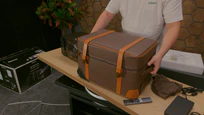
We've unboxed many projectors, but the case supplied with the XR10 still impressed us. It's sturdy, well finished and feels more like a proper piece of luggage than electronics packaging. Inside you get the projector, a fabric cover, a remote control, a power cable and the documentation. Importantly, the case remains useful after the initial unboxing. You can pack the whole kit into it and transport it easily. During our tests we also placed the projector on it, as its rigidity and height worked well in that role. The XR10 itself also looks very good. The chassis is solid and the finish suits equipment at this price point. After all, this is quite a substantial unit: about 11 kg in weight and a footprint of roughly 27 × 29 cm. It's a projector you can take with you, but for everyday use it will probably have its place in the living room.
Ports
Feature | Hisense XR10 |
|---|---|
HDMI inputs | 3, including 2 labelled HDMI 2.1 |
Audio return channel | 1 eARC |
USB | 2 |
Wired network | LAN |
Audio outputs | Optical and headphone |
Wireless connectivity | Wi-Fi 7, Bluetooth 5.4 |
There are enough ports to hook up a console, a player and a sound system without constantly swapping cables. eARC is especially useful, as it makes connecting the projector to a soundbar or AV receiver much easier.
Hisense XR10 - Installation and picture setup
Automatic adjustment
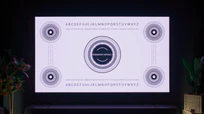
You can set the XR10 up, point it at a wall and let it take care of the rest. The projector automatically adjusts focus, corrects geometry and takes obstacles into account. In our tests it handled this smoothly; even when positioned at an angle we quickly obtained a rectangular picture. That's handy when we move the unit elsewhere or simply want to start a film without lengthy preparation. For a permanent installation it's worth spending a few minutes on finer adjustments, as the XR10 has really good tools for that.

Zoom and lens shift
The motorised 2.5× optical zoom lets you achieve a 120-inch image from around 2.2 to 5.3 metres. That gives you a lot of flexibility: the projector can sit behind the sofa or closer to the back wall, depending on how you’ve arranged the room. There’s also optical lens shift for vertical and horizontal adjustment. Lens shift allows you to position the projection without tilting the projector. So we can place the XR10 below the screen or mount it on the ceiling and shift the image into the right place using the lens.
This is precisely how we would set it up for everyday viewing: square to the screen, with the geometry optically adjusted. Digital keystone correction uses only part of the available projection area, which reduces detail and can leave a dark border around the image. With such advanced optics, it’s a shame not to take advantage of them. Finally, we fine-tuned the focus manually. The autofocus was close, but a small adjustment produced an even better result.
Hisense XR10 - Contrast and black level
Aperture setting | Measured contrast |
|---|---|
Open | around 2,500:1 |
Fully closed | around 5,000:1 |
With the iris open we measured around 2,500:1. For a DLP projector this is a very good result and a big step forward compared with older designs of this type. In dark scenes you can see detail, the image remains clear, and shadows do not merge into a single patch. If you compare it with a good LCoS projector in a darkened room, however, you will notice a difference in the actual depth of black. On the XR10 it remains slightly grey. This is the most important compromise of this model and the feature that will be noticed mainly by those accustomed to JVC or Sony cinema projectors.
The iris makes a noticeable improvement
When the iris was fully closed the contrast rose to around 5000:1, roughly double. That's a change worth taking advantage of for evening SDR viewing. There's plenty of brightness then, so we can sacrifice some of it in exchange for better blacks.
Reducing the laser power itself works differently: it lowers the brightness of both whites and blacks. The iris allowed us in our test to improve the balance between them. You have seven manual settings and two automatic modes, Cinema 1 and Cinema 2.
How does this fare in a typical living room?
A lot depends on the room. Light-coloured walls and ceiling reflect light from the screen back onto its surface and worsen black levels. It's easiest to notice this in scenes where bright elements sit next to dark areas. That's why the advantage of a more expensive projector with very high contrast won't always be as large in the living room as in a dedicated screening room. The XR10 copes well in such conditions: it offers decent black levels while still giving plenty of brightness headroom for watching on a really large screen.
Hisense XR10: HDR quality
Brightness is one of the main reasons the XR10 impressed us so much. On a 120-inch white, matte Adeo screen with a gain of 1.0 we measured roughly 300 nits in SDR. We're talking about settings you'd normally use to watch a film, not a mode tuned solely for the highest possible reading. Converting the on-screen measurements yields about 3700 lumens.
Parameter | Result |
|---|---|
SDR brightness on 120″ screen | 300 nits |
Light output | about 3700 lm |
DCI-P3 coverage | full |
BT.2020 coverage | 97.5% |
Brightness reproduction in HDR
When watching bright scenes it quickly becomes clear why the projector has that extra headroom. The image has real punch, and the brightest parts retain detail. Combined with a wide colour gamut, this delivers very striking HDR. The projector adapts the material's brightness to its capabilities. On our screen an around twofold reduction in luminance compared with the values encoded by the PQ curve worked well. After applying that scaling the EOTF curve was very close to the target. Put simply: the image kept the correct brightness proportions instead of over-brightening some areas and losing others. We left the additional tone-mapping function switched off. In our setup it boosted the image too much. Without it we achieved a more controlled result, with good brightness and highlight detail.
Dolby Vision and HDR10+
Dolby Vision worked well. Dark and Bright modes are available, and in the content I watched bright areas retained detail and did not wash out into a white patch. The XR10 also supports HDR10+. Both formats use dynamic metadata, which allows the way HDR is displayed to be adjusted for individual scenes. In a projector this is particularly important because the available brightness range needs to be used as effectively as possible.
150, 200, or maybe 300 inches? What size screen makes sense?
Having plenty of light encourages you to enlarge the image. Based on a measurement at 120 inches, we calculated how brightness would change at larger diagonals:
Diagonal | Approximate brightness |
|---|---|
120″ | 300 nits |
150″ | 192 nits |
180″ | 133 nits |
200″ | 108 nits |
250″ | 69 nits |
300″ | 48 nits |
The calculations assume the same aspect ratio, screen gain and amount of light reaching it. In a particular installation the zoom setting will also matter. 150 to 200 inches looks like a very attractive range here. You get a huge image, and there's still enough brightness for HDR to make an impact. At 120 inches the effect will be stronger. At 200 inches the projection's scale itself will play a larger role. You can choose the balance between those two factors to suit your room and preferences. 300 inches also makes sense. Calculations then give about 48 nits, a level associated with classic cinema SDR screenings. In a well-darkened room you can therefore go really big with the screen size.
Hisense XR10 – Factory colours
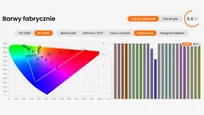
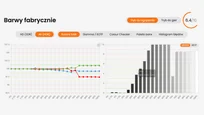
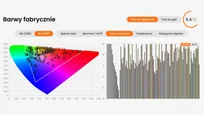
The colours are produced by three separate lasers: red, green and blue. We measured 97.5% coverage of BT.2020 and full DCI-P3. This is one of the most impressive results in the entire test. The wide gamut lets it reproduce very intense colours found in HDR content. The XR10, however, uses it sensibly. With standard SDR material it narrows the colours to Rec.709, so you don't see everything with overly boosted saturation. It only reveals its full capabilities when the content actually needs them.
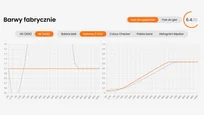
For viewing we chose Filmmaker mode. Straight out of the box it provided a good starting point: gamma ran close to the target, and the white balance was only slightly warm. The picture didn't require major tweaking to comfortably sit down and enjoy a film.
Hisense XR10 - Colours after calibration
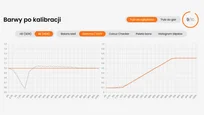
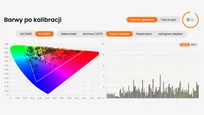
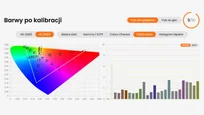
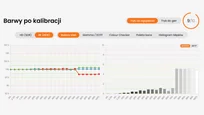
Calibration went smoothly. In our unit a two-point white balance adjustment was enough to remove a slight warm bias. The remaining errors fell to a level we did not notice during normal viewing. There is also a twenty-point adjustment and a full colour management system. It's a good set of tools for fine-tuning the picture to a specific screen and room. This time we didn't need to use all the options.
Laser power and white balance
When setting up the XR10, you need to take one thing into account: the white balance is shared between SDR and HDR, and the white point shifts with laser power. At maximum power the image shifts more towards green. We calibrated the projector at maximum power because HDR was our main priority. If someone watches SDR with the laser turned down significantly, and HDR at full power, a single adjustment won’t be ideal for both settings. Separate white-balance memories would be very helpful here.
Hisense XR10 – Resolution and image sharpness
After manually adjusting the focus, the XR10 looked very good. Fine text, object edges and game UI elements were readable both in the centre and at the edges of the screen. We did not have to choose between a sharp centre and blurred corners. From very close up you could notice slight coloured fringing on high-contrast edges. During normal viewing, however, we paid much more attention to the good overall image detail.
How does 4K work here?
Inside there is a 0.47-inch DLP chip, with a physical micromirror count equivalent to Full HD. 4K is produced using the XPR mechanism. The image is shifted very rapidly between four positions, and each position shows a different portion of the frame's information.
This allows the projector to address more than eight million positions on the screen. On fine test patterns a good native 4K imager can separate the finest structures more clearly. In films the difference is much harder to notice, especially from normal viewing distances. In practice the XR10's level of detail is decidedly closer to 4K than to Full HD. On a large screen this produces a well-refined, sharp image that invites watching high-quality content.
Hisense XR10 – Motion blur and motion handling
The XR10 displays 4K at 60 Hz and Full HD at 240 Hz. For films there is also a single‑slider motion smoothing control that lets you adjust motion smoothness to your own preference. At a moderate setting it worked well and did not introduce significant artefacts into the viewed material. So you can slightly calm the motion without straying too far from the cinematic character of the image. Those who prefer stronger smoothing also have room to adjust. A Full HD signal at 120 Hz is accepted and displayed internally at 240 Hz with frame repetition. The highest refresh rate is best utilised by supplying a native 240 Hz signal, for example from a computer.
Rainbow effect
The XR10 is a single-chip DLP projector, so it displays colour components sequentially. Some viewers may notice brief coloured flashes when moving their gaze, especially with bright text or objects on a dark background. Sensitivity to this effect varies greatly between individuals. If you've previously seen a DLP projector, you probably know how you react to it. For a first-time purchase it's best to check this during a short demo with demanding scenes.
Hisense XR10 - Features for gamers
Playing on a very large screen is one of the most enjoyable ways to use the XR10. There are two main settings available: 4K at 60 Hz when detail matters, and Full HD at 240 Hz when speed is the priority.
Function or mode | Test result / availability |
|---|---|
4K, 60 Hz | Supported |
4K, 120 Hz | Not available |
Full HD, 240 Hz | Supported |
ALLM | Supported |
DLP Turbo | Available; reduces input lag, alters colours |
1440p, 120 Hz | Signal accepted, but frame drops were observed |
For graphically focused games and a more relaxed pace we'd choose 4K/60 Hz. Full HD at 240 Hz will be more appealing to people playing fast-paced titles on a PC. The projector supports ALLM, so it can automatically switch to game mode when it detects a suitable signal. 1440p at 120 Hz didn't work in our tests; the projector accepted the signal but dropped frames. That's why we'd stick to the two main modes.
Input lag
Resolution and refresh rate | Input lag |
|---|---|
Full HD, 240 Hz | 9 ms |
4K, 60 Hz | 35 ms |
4K, 60 Hz DLP | 21 ms |
9 ms at Full HD and 240 Hz is a very good result. In this setting the XR10 delivers low latency that suits fast-paced gaming. At 4K/60 Hz we measured 35 ms, and with DLP Turbo enabled it was 21 ms. The difference can matter in games that require quick reactions. Turbo does affect colours, so for more relaxed titles we'd stick with the standard mode and use the extra reduction in latency where it's needed.
Hisense XR10: Choosing a screen and watching in the living room
We tested the XR10 on a standard white, matte Adeo screen with a gain of 1.0. Even on that surface we obtained a very bright image, so a good result did not require a high-gain screen.
We also did not notice laser speckle on our screen, that is the fine, shimmering texture that can appear with laser light sources. This is an important observation, because such a texture can distract from the film. Here the image was clean in that respect. When selecting a different projection material, it's best to check it with the projector, because the screen surface affects the visibility of this phenomenon.
How much light can remain in the room?
The XR10's high brightness gives you more freedom for less demanding viewing, although the best contrast is achieved by reducing the light falling on the screen. For an evening film, simply make sure the windows are covered and switch off any lamps that illuminate the projection surface.
Hisense XR10: Operation, VIDAA and apps
In everyday use the XR10 feels like a television. You switch the device on, pick an app and start a film. VIDAA is responsive, and access to the main streaming services means you can use the projector without an external streaming device. That's particularly convenient when you move it to another location. You don't need to recreate the whole setup with a player and extra cables; to use the apps you only need power and an internet connection. AirPlay is also available.
Remote well suited to the projector
The remote is backlit and has separate buttons for adjusting laser power and focus. These are small details you notice straight away, because they’re exactly the settings you reach for when preparing a viewing. You don’t have to dig deep into the menu each time. There are also shortcuts to streaming services, and you don’t need to point the remote at the screen to control it. Overall it’s comfortable and suits the device you often use in the dark.
3D support
The XR10 supports active 3D, including frame packing and side-by-side. Compatible DLP-Link glasses are required, and unfortunately they must be purchased separately.
The projector's high brightness is very useful here, because the glasses reduce the amount of light reaching your eyes. For those with a collection of Blu-ray 3D films, it's a good reason to revisit favourite titles, this time on a truly large screen.
Hisense XR10 - Sound
You don't usually expect much from a projector's speakers. The XR10 pleasantly surprised us: there's audible bass, plenty of volume, and you can comfortably watch a film without connecting extra equipment. Inside are two 8 W speakers and a 15 W subwoofer, tuned by Devialet. The sound is more like that of a decent TV than the basic auxiliary speaker you often find in projectors. Such a setup makes a lot of sense for occasional viewings or when travelling. For a permanent home cinema we'd add a soundbar or an AV receiver with speakers to achieve a larger soundstage and anchor dialogue to the screen. Connecting via eARC is a convenient solution here.
Operating noise and cooling
The XR10 uses closed-loop liquid cooling. The effect when watching is good: in standard modes the projector operated quietly, even at maximum laser power. From the sofa its hum was barely audible. A noticeable change occurred after switching on the "brightness boost" function. The projector became louder and the image took on a green tint. For films we'd leave this function off, because the standard settings already provide plenty of light and a much more pleasing image.
Hisense XR10: Technical specifications and test conditions
Parameter | Information |
|---|---|
Technology | Single-chip DLP |
Chip diagonal | 0.47″ |
Method of achieving 4K | XPR, four image positions |
Light source | Three RGB lasers |
Main display modes | 4K/60 Hz, Full HD/240 Hz |
Zoom | Optical, motorised, 2.5× |
Lens shift | Optical, vertical and horizontal |
Iris | 7-step manual and 2 automatic modes |
Operating system | VIDAA |
Cooling | Liquid, closed-loop |
Audio | 2 × 8 W + 15 W, Devialet |
Weight | about 11 kg |
Test screen | Adeo, white matte, 120″, gain 1.0 |
Watch the full test of the Hisense XR10, including a presentation of the device and Maciej's discussion of the measurements, in our video review.
The projector for testing was loaned to us by Hisense. The manufacturer had no influence over the content of the review or the measurement results.