 Redakcja Choose TV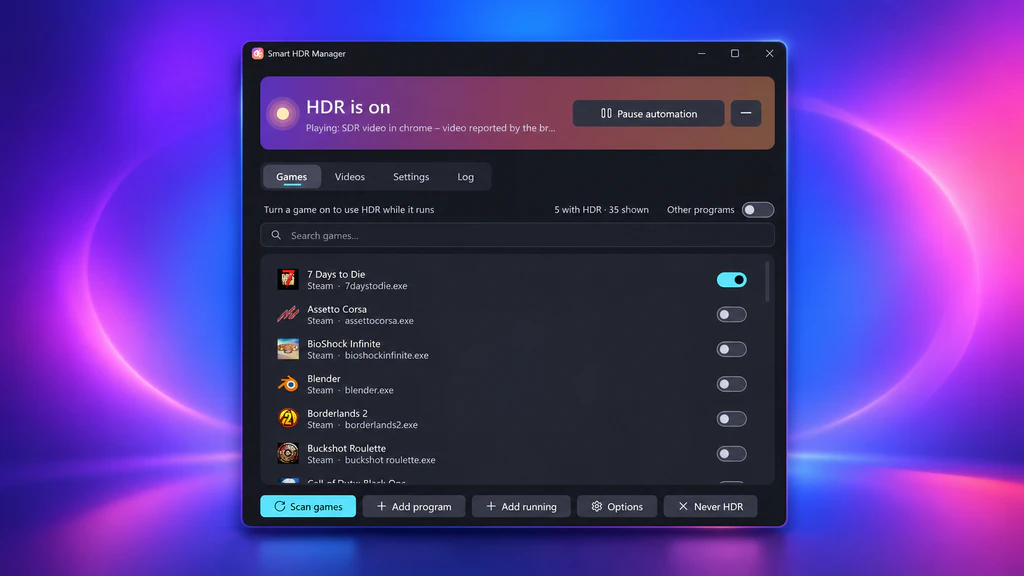
Do you have an HDR monitor and are you annoyed by the picture constantly switching between SDR and HDR? There's a tool that can solve this problem! Smart HDR Manager automatically enables HDR when launching selected games and playing movies, and restores the standard picture mode afterward. Best of all, the program is completely free!
How does it work?
Smart HDR Manager is a small application created by independent developer VantaCode420. It runs in the background on Windows and eliminates the need to manually enable HDR in the settings or use the Win + Alt + B shortcut. The program automatically finds games in the libraries Steam, Epic Games, GOG, Xbox, Ubisoft Connect, EA and Rockstar Games Launcher. The user can then choose which titles should launch with HDR enabled. When a game is closed, the app automatically reverts to SDR. The latest version, 2.5.1, also adds a Launch with HDR feature that turns on HDR even before the game starts. This is important because some titles check for HDR availability only at launch.
HDR also on YouTube and when watching videos
The app’s capabilities aren’t limited to games. Smart HDR Manager also works with VLC, MPC-HC, PotPlayer, and mpv players, and thanks to an additional Tampermonkey script it can detect HDR videos on YouTube. It also supports NVIDIA RTX Video HDR, a technology that lets compatible GeForce RTX cards convert standard SDR content into HDR. An interesting addition is the ability to block automatic HDR when using OBS, which can help avoid color issues in recordings.
Smart HDR Manager can be downloaded for free from GitHub. The program is released under an open source license but is still in beta. The developer mainly tested it on Windows 11 with an NVIDIA RTX 5070 Ti card and a single HDR monitor. Its behavior on AMD and Intel cards, and in multi-monitor configurations, has not yet been thoroughly verified.
Sources: Videocardz, Reddit