 Redakcja Choose TV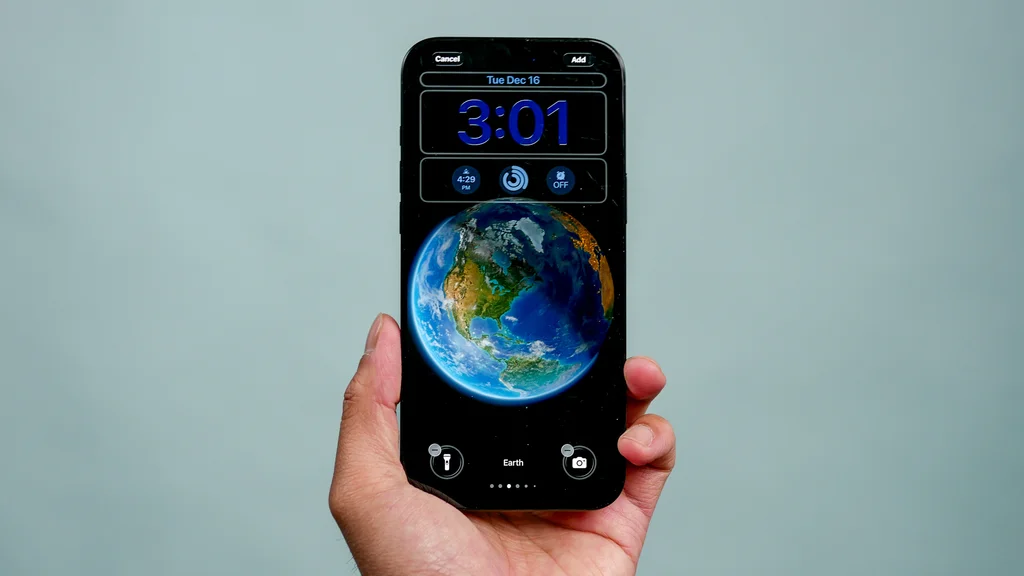
Apple has released the first beta of iOS 26.3 to developers. The update is rather modest for now, which is not surprising – it is the last beta before the holiday break, and traditionally, more significant new features appear only in subsequent releases. Nevertheless, one change stands out: the revamped iPhone wallpaper gallery. Until now, the system featured a shared section "Weather & Astronomy." In iOS 26.3, Apple has decided to split it into two separate sections:
Weather
Astronomy
The name change itself is a minor detail, but it brings along something more.
More weather wallpapers, less configuration
The biggest news is the expansion of the Weather section. In iOS 26.2, users had access to only one weather wallpaper. In iOS 26.3 beta 1, there are already three different variants. Each of them works on the same principle – the wallpaper displays current weather conditions for the current location. The differences appear in the details: Apple has prepared various font styles, different widget layouts, and distinct lock screen compositions.
Everything is ready immediately, without the need to manually tweak each element. This is a clear signal that Apple wants to simplify customization. Instead of providing one solution and forcing the user to fiddle with the settings, the company offers several refined styles to choose from.
Astronomy separately, order in the gallery
The separation of the Astronomy section is more about organizing the interface than a revolution, but the result is clearer. Wallpapers related to Earth, the Moon, or the Solar System no longer get lost in a common folder with weather and are easier to find. The changes in wallpapers are minor, but they may signal something more in the later part of the beta cycle for iOS 26.3. Apple has been gradually developing the lock screen and context-responsive wallpapers over several versions of the system – weather is a natural direction here.
For now, it looks like a cosmetic but sensible improvement. If the next betas bring more dynamic variants or new types of system wallpapers, iOS 26.3 may turn out to be more interesting than the first release suggests. And how about you – do you use Apple's default wallpapers, or do you always opt for your own photos and custom solutions?